Off-grid, encrypted, zero-subscription mesh messaging that works when cell towers go down. That is Meshtastic in one sentence. If you have heard the name floating around ham radio forums, emergency preparedness groups, or hiking communities lately, there is a reason: this thing is genuinely useful, the hardware costs almost nothing, and you do not need a ham license to get started.
This guide covers everything in your starter kit — hardware tiers from $20 to $200, what else you need to buy, how to flash firmware in under ten minutes, and how to build a solar-powered permanent node for about $30.
What Is Meshtastic and Why Should You Care
Meshtastic is an open-source protocol that turns cheap LoRa radio modules into a self-healing mesh network. Each device is both a radio and a router — your message hops from node to node until it reaches its destination, without any internet connection, cell service, or central server involved. Messages are encrypted end-to-end by default.
The protocol runs on the 915 MHz ISM band in the US (433 MHz in Europe, 868 MHz in parts of the EU), which is the same unlicensed frequency space used by garage door openers and wireless weather stations. LoRa (Long Range) is a spread-spectrum modulation technique that trades data rate for remarkable range — a single node can realistically hit 5 to 15 miles line-of-sight, and a mesh of nodes can blanket a mountain range or a city.
The use cases are broad and growing fast:
- Hikers and backcountry users sending position updates and messages where phones have no signal
- CERT teams and emergency managers who need comms when infrastructure is compromised
- Preppers building resilient household and neighborhood communication networks
- Privacy advocates who want messaging that does not touch a corporate server
- Ham radio operators exploring digital modes, experimenting with mesh networking, or using Meshtastic for SOTA and POTA position reporting
In 2026, Meshtastic integration with iOS TAK (Team Awareness Kit) has pushed the platform firmly into professional emergency management territory. This is not just a hobbyist curiosity anymore.
License Requirements: What You Need to Know
This is worth getting right, so here is the plain version.
No license required for operating Meshtastic on the 915 MHz ISM band in the US, as long as you stay under 1 watt of transmit power. This covers the vast majority of Meshtastic use. The hardware described in this guide runs well under 1W by default, and that is plenty for typical mesh networking.
A ham radio license unlocks more options. With a Technician class license or higher, you can operate on certain amateur radio frequencies and at higher power levels, which translates directly to longer range. Some operators run Meshtastic nodes on MURS frequencies or on ham 2-meter and 70-centimeter bands. Higher power means your node can bridge longer gaps in a mesh.
If you want to get licensed, the ARRL’s online resources and the HamStudy.org practice exams make it straightforward — most people pass the Technician exam with a few weeks of casual study.
For the purposes of this guide, assume no license required unless otherwise noted.
The Three Hardware Tiers
Tier 1 — “Just Want to Try It” ($20–35)
Heltec LoRa 32 V3
The Heltec LoRa 32 V3 is the classic entry point. At $20 to $30, it gives you an ESP32 processor, an SX1262 LoRa radio, a built-in OLED display, and USB-C charging on a single board roughly the size of a pack of gum. You can search for it on Amazon and have it on your doorstep in two days.
What it does well: it is cheap, widely supported, and there are more tutorials for ESP32-based Meshtastic boards than for anything else. If you get stuck, the answer is already on Reddit or the Meshtastic Discord.
What to know going in: the ESP32 chip is power-hungry compared to newer alternatives. Battery life with a 2000mAh LiPo is in the 12 to 24 hour range depending on how often it transmits and whether you have the display active. This is not a device you can run passively for a week without charging.
Best for: testing the system at home, running as a fixed desktop or wall-mounted node, or anyone who wants to understand how the platform works before spending more money. Flash it, connect it to the app, and start exploring. You can always repurpose it as a home router node later.
If you want to carry this one, turn off the OLED display in firmware settings — it is the biggest battery drain on the board.
Tier 2 — “I Want to Actually Carry This” ($50–100)
This is the tier where Meshtastic goes from interesting experiment to daily-carry tool.
LILYGO T-Echo (~$50–65)
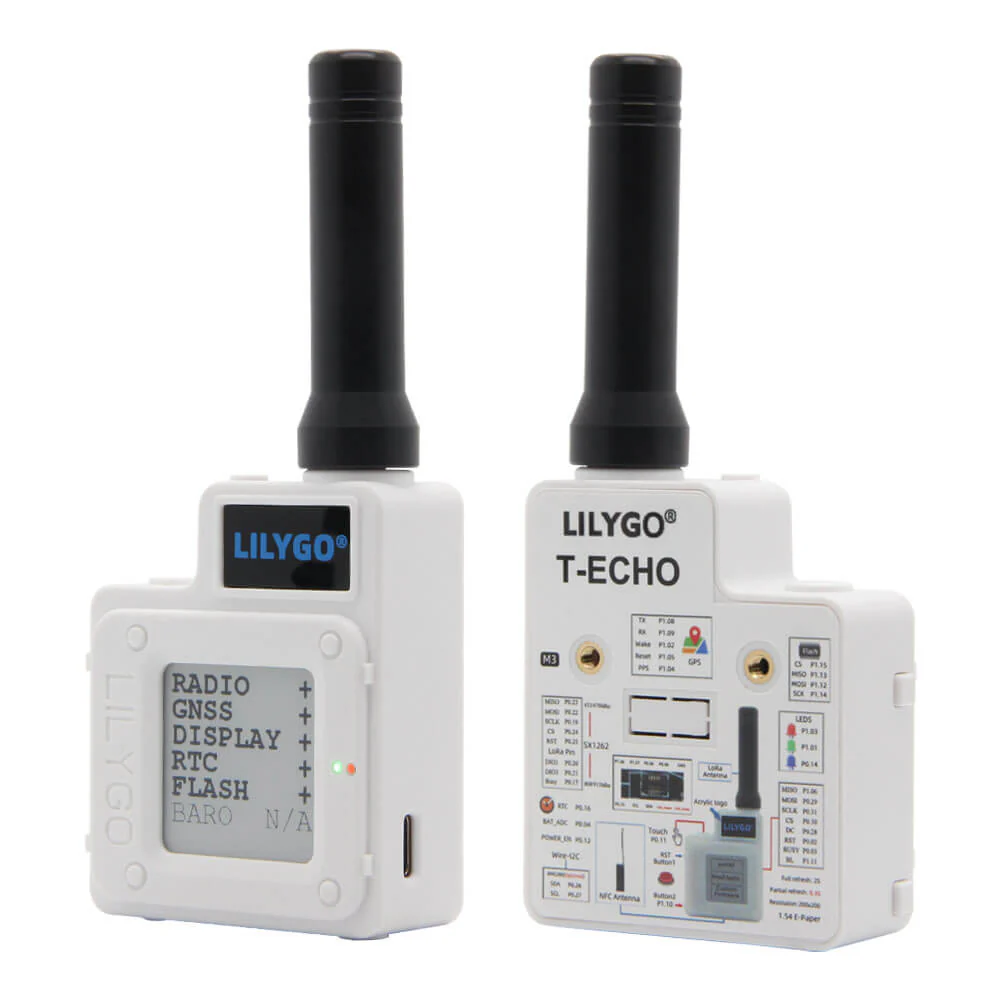
The LILYGO T-Echo is the sweet spot for a portable personal node, and it is the device most Meshtastic regulars end up carrying. Here is why:
The T-Echo runs an NRF52840 processor instead of an ESP32. The NRF52840 is a Bluetooth-capable ARM chip designed with power efficiency as a first priority. Pair that with an E-ink display — the same kind used in Kindles — and you have a device that can show your node status, message count, and GPS coordinates without drawing meaningful power from the battery. The display only uses power when it updates, not while it is showing something.
The T-Echo also has a GPS module built in. This means your node broadcasts its position automatically, which is how Meshtastic maps work and how your hiking group can see where everyone is.
Real-world battery life on the T-Echo runs 24 to 72 hours on a full charge depending on transmission frequency and GPS polling settings. That is a meaningful difference from the Heltec.
The form factor is pocket-friendly, the firmware support is mature, and the community around it is large. If you are buying one device to carry hiking, camping, or into the field, this is the one.
RAKwireless WisMesh Pocket V2 (~$99)
The RAKwireless WisMesh Pocket V2 is for people who want Meshtastic to just work without any tinkering. It arrives pre-assembled, pre-flashed, and IP65 weather-resistant. There is no soldering, no firmware flashing, no driver headaches. Open the box, pair it with the app, and you are on the mesh.
The IP65 rating means it is dust-tight and can handle water jets — real outdoor protection, not just splash resistance. The WisMesh Pocket V2 is the right answer for CERT team members, emergency managers, or anyone who needs to hand a device to someone who is not going to read a setup guide.
It costs more than the Heltec, but you are paying for polish and reliability out of the box.
Tier 3 — “I Want a Permanent Node” ($100–200+)
Spectre Pro (~$200)
The Spectre Pro is a standalone, weatherproof Meshtastic device built for permanent outdoor deployment. It has a large internal battery, solar input, and is rated for outdoor environments. This is the device you mount to a rooftop, a fence post, or a hilltop and leave for months.
If you are building out mesh coverage for a neighborhood, a campground, a ranch, or a rural property, the Spectre Pro is a legitimate set-it-and-forget-it solution. It is priced accordingly.
DIY Solar Node (~$30–50)
For the technically inclined, a DIY solar node is a deeply satisfying build and costs a fraction of a commercial solution. More on this below.
What Else You Need
Antenna
Almost every Meshtastic board ships with a small rubber duck antenna, and almost every one of those antennas is the weakest link in your setup. Upgrading your antenna is the single highest-impact improvement you can make to range and reliability.
For 915 MHz (US), a proper 1/4 wave whip antenna or a fiberglass omni antenna costs less than $15 and can meaningfully extend your range. For a fixed node at height, a gain antenna pointed at the horizon will outperform a rubber duck at any power level.
If you are just carrying a node in your pocket, the stock antenna is fine. But for any node you are mounting outdoors or using as a mesh router, budget for a real antenna.
Case
The Heltec LoRa 32 V3 is a bare board. For a portable node, you need something around it. Printables.com has dozens of community-designed cases for popular Meshtastic boards — search for “Heltec LoRa 32 V3 case” and you will find options ranging from minimal clip-on shells to full enclosures with belt clips. A standard project enclosure from your local electronics supplier works too.
For outdoor nodes, use a weatherproof electrical enclosure — more on this in the solar section.
Battery
Most NRF52840-based boards (the T-Echo, the WisBlock modules) accept a standard JST-PH 1.25mm or 2.0mm LiPo connector. A 1000mAh LiPo is fine for daily carry if you charge overnight. A 2000mAh LiPo will get most people through a full weekend without charging.
For ESP32-based boards, check the connector spec on your specific board before ordering a battery — pinouts vary and reversing polarity can damage the board.
Flashing Firmware
Meshtastic firmware is open-source and actively maintained. You can always find the latest stable release at meshtastic.org.
For most boards, you do not need to install any software. The web flasher at flasher.meshtastic.org runs entirely in your browser (Chrome or Edge required for WebSerial support). Plug in your board via USB, visit the flasher, select your device model, and click Flash. The process takes about two minutes.
After flashing, connect the Meshtastic app on iOS or Android via Bluetooth. From there you configure your region (US, EU, etc.), your node name, and your channel settings. The app walks you through it with a setup wizard.
The Meshtastic community maintains excellent documentation, and the Discord server is active and genuinely helpful if you get stuck.
Finding Your Local Mesh
Before you buy anything, check meshtastic.org/map to see what is already in your area. Most major US cities have multiple active nodes. If you are within range of existing infrastructure, you can join an established mesh immediately.
If your area is sparse or empty, that is an opportunity. The best way to grow a local mesh is to deploy a well-placed, high-altitude fixed node — a rooftop node at 30 feet can serve an entire neighborhood. Be the person who starts the local mesh. The community will find you.
Building a Solar-Powered Permanent Node
A solar-powered outdoor Meshtastic node is one of the best bang-for-buck projects in amateur radio or off-grid communication. Here is a parts list for a complete build:
- Microcontroller: Heltec LoRa 32 V3 or any ESP32 LoRa board (~$20–25)
- Enclosure: Hammond 1554D2 polycarbonate weatherproof enclosure, or equivalent (~$12)
- Solar panel: Small 5V or 6V panel, 2W or larger (~$8–12)
- Charging board: TP4056 with protection circuit (~$2–3)
- Battery: 18650 lithium cell, 2600mAh or larger (~$5–8)
- Antenna: 915 MHz 1/4 wave whip with pigtail (~$8–12)
- Misc: Gland fittings for antenna cable, mounting hardware
Total cost: roughly $55–75 for a complete build.
Wire the solar panel to the TP4056 input, the 18650 to the TP4056 battery terminals, and the TP4056 output to the VCC/GND on the Heltec board (check your board’s input voltage spec — some have a boost circuit and accept 3.7V, others want 5V via USB). The TP4056 handles charge management and protection automatically.
Mount the enclosure as high as you reasonably can — even a few extra feet of elevation translates to meaningful range improvement in a mesh. Run the antenna out through a weatherproof gland fitting and mount it vertically.
Properly configured, a solar node like this will run indefinitely and can serve as the backbone of a neighborhood or campground mesh.
The Ham Radio Connection
Meshtastic is attractive to licensed hams for reasons beyond just higher power. If Meshtastic sparks an interest in licensed radio, our best budget handheld ham radio guide for 2026 covers the cheapest way to get on the air with a Technician license.
SOTA (Summits on the Air) and POTA (Parks on the Air) activators are increasingly using Meshtastic nodes for position reporting and check-ins. A node on a summit with line-of-sight in every direction can reach remarkable distances — 50+ miles is not unusual from a high point.
Licensed operators can experiment with Meshtastic on MURS frequencies (no exam required for MURS, but limited to 2W) or on the 2-meter and 70-centimeter amateur bands with appropriate power levels. Running higher power on 915 MHz ISM is possible with a ham license and the right hardware, though the practical benefit depends heavily on your antenna and environment.
The Meshtastic community has a healthy overlap with the ham radio community, and the two hobbies complement each other well. If you are already licensed, Meshtastic gives you a digital mode with real practical utility. If you are not yet licensed, Meshtastic might be what finally pushes you to study for your Technician.
Frequently Asked Questions: Meshtastic Setup
Do you need a ham radio license to use Meshtastic?
No. Meshtastic operates on the 915 MHz ISM band in the US at power levels under 1 watt, which does not require an amateur radio license. Anyone can legally buy, set up, and use a Meshtastic node without any license. If you connect Meshtastic to a licensed ham radio transmitter for higher power or different frequencies, a license would then be required for that use.
How far can Meshtastic nodes communicate?
Range depends heavily on antenna placement and terrain. In open areas with elevated nodes, 5–10 km between devices is common. With a rooftop repeater node and a quality antenna, 30+ km links have been documented. Urban environments with buildings and obstructions typically reduce range to 1–3 km. The mesh extends your effective reach by relaying messages through intermediate nodes automatically.
What is the cheapest way to get started with Meshtastic?
The least expensive entry point is the Heltec LoRa 32 V3, which typically costs $20–$35 and requires only a USB cable and a phone with the Meshtastic app to get running. You will need to flash the firmware using the browser-based flasher at flasher.meshtastic.org before first use. Add a basic external antenna ($5–$10) to improve range significantly over the stock antenna.
Can Meshtastic nodes run on solar power?
Yes. A basic solar-powered repeater node can be built for $30–$50 using a small 5W–10W panel, a TP4056-based charging board, and an 18650 lithium cell. Power-efficient hardware like the LILYGO T-Echo (nRF52840 chip) is better suited for solar deployments than ESP32-based boards due to significantly lower deep-sleep current draw. Properly sized, a solar node can run indefinitely as a fixed mesh repeater.
What Meshtastic hardware works best for a portable handheld node?
The LILYGO T-Echo ($50–$65) is the most popular choice for a self-contained handheld node. It includes an e-ink display, GPS, and a case in one unit, runs on the efficient nRF52840 chip for excellent battery life (24–72 hours), and is easy to flash via UF2 drag-and-drop. The RAKwireless WisMesh Pocket V2 ($99) is the step-up option for a more polished, IP65-rated device.
Where to Find Current Deals
Meshtastic hardware moves in and out of stock and prices shift constantly. The builds described in this guide are achievable at the price points listed, but specific deals come and go.
Check the HamDeals deals page for current pricing on Meshtastic hardware, including the LILYGO T-Echo and the RAKwireless WisMesh Pocket V2. We track prices across major retailers and flag when something worth buying drops to a good price.
The barrier to entry here is genuinely low. For under $30, you can have a working Meshtastic node on your desk this weekend. For under $100, you can have a polished, GPS-equipped, day-carry device that will outlast your phone battery on a backcountry trip. And for the cost of a nice dinner out, you can build a solar-powered mesh node that runs forever on a rooftop.
The mesh is already out there. Go find it.